
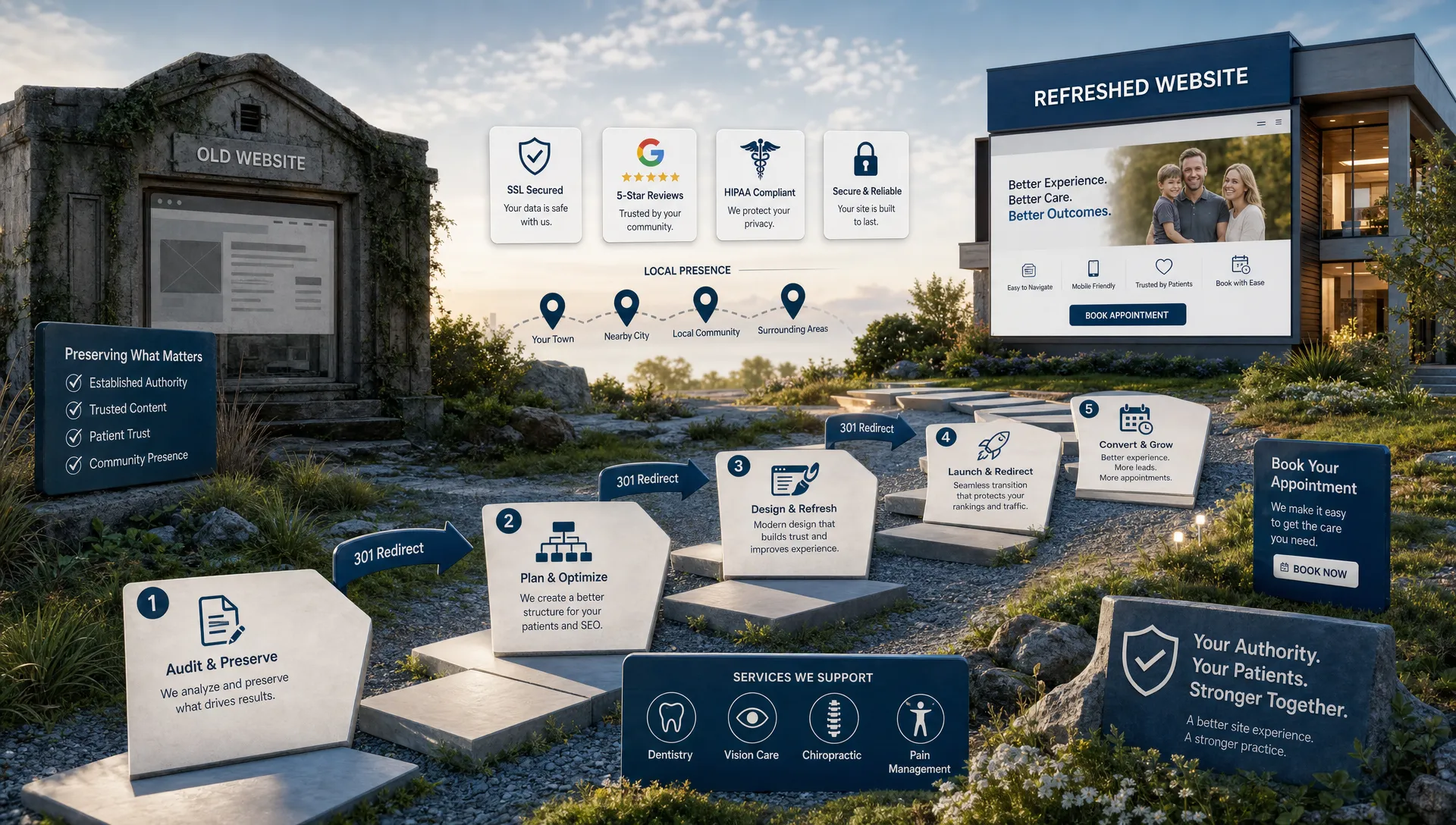
A healthcare website redesign should make your practice easier to trust, easier to find and easier to contact. It should not erase years of SEO work in a single launch.
That risk is real. A redesign often changes URLs, page copy, navigation, metadata, internal links, schema, forms and site speed at the same time. Search engines use those signals to understand which pages deserve visibility. Patients use them to decide whether to call, request an appointment or keep looking.
If your team is searching for “website redesign Louisville” because your dental, optometry, chiropractic, pain management or specialty practice has outgrown its current site, treat the project as both a design project and an SEO migration. The safest redesigns start with a plan for preserving what already works before adding anything new.
Why healthcare website redesigns lose rankings
Most ranking drops after a redesign are not caused by the new design itself. They usually come from missing migration steps.
A high-performing implant dentistry page, LASIK page, dry eye page or pain management page may have earned visibility over several years. If that page is deleted, merged into a generic services page or moved without a proper redirect, Google has to reassess the new version. The same thing happens when a redesign strips out clinically useful copy, removes location details, changes title tags or hides important content behind scripts that search engines struggle to process.
Healthcare sites also have a higher trust burden than many local business websites. A patient comparing providers wants clear services, credentials, reviews, insurance information when applicable, location details and a simple path to book. Google’s systems also evaluate quality signals more carefully for content that can affect health or wellbeing. A redesign that looks modern but weakens substance can lose both rankings and conversions.
Google’s own documentation on site moves with URL changes recommends planning URL changes carefully, mapping redirects and monitoring after launch. That advice applies even if your practice is staying on the same domain but changing page paths.
Start with an SEO and conversion audit before design begins
Before wireframes, colors or homepage concepts, document the pages and signals that already create patient demand. This gives your redesign team a baseline and prevents accidental losses.
At minimum, review Google Search Console, Google Analytics 4, call tracking, form submissions, Google Business Profile data and current keyword visibility. The goal is not just to find your “top pages.” The goal is to identify which pages attract qualified patients and which pages support trust during the decision process.
| Asset to audit | Why it matters during a redesign | What to preserve or improve |
|---|---|---|
| Top organic landing pages | These pages already earn search visibility | URL, search intent, core content, title tag and internal links |
| Service pages | Patients search for specific treatments and conditions | Clear service detail, location relevance, provider trust and booking CTAs |
| Location pages | Local rankings depend on accurate location signals | Name, address, phone, hours, map links, nearby context and schema |
| Provider bio pages | Healthcare decisions are trust-driven | Credentials, specialties, photos, review signals and appointment paths |
| Blog or education pages | These can attract early-stage patients | Useful content, medical accuracy, internal links and update opportunities |
| Backlinked pages | External links pass authority and referral traffic | Live destination pages or one-to-one 301 redirects |
| Conversion points | Rankings only matter if patients can take action | Calls, forms, online scheduling links, click-to-call and tracking |
For practices evaluating vendors, this is one reason design and SEO should not be separated too far. A partner who only focuses on the look of the site may miss the ranking systems underneath it. Louisville Web Lab’s guide on what to look for in a website design and SEO company is a useful companion if you are comparing agencies for a healthcare redesign.
Decide what should stay, improve, merge or retire
A strong redesign does not mean every old page should be replaced. Some pages should be kept almost intact because they already rank and convert. Others should be expanded, consolidated or redirected because they are thin, outdated or no longer aligned with the practice.
Use four simple categories during content planning:
- Keep pages that earn qualified organic traffic, backlinks, conversions or strong local relevance.
- Improve pages that rank on page two, attract impressions without clicks or need clearer patient-focused copy.
- Merge pages only when they target the same search intent and can be combined without making the new page too broad.
- Retire pages that are outdated, clinically inaccurate, duplicated or irrelevant to current services.
Be careful with merging. A dental implant page, dentures page and full-mouth reconstruction page may feel related internally, but patients search those topics differently. The same is true for dry eye, cataracts and LASIK, or chiropractic care, physical therapy and regenerative medicine. Combining distinct services into one generic page often weakens relevance.
If a page needs rewritten content, keep the intent consistent. For example, if an old page ranks for “Invisalign in Louisville,” the redesigned page should still answer that need clearly. It can be better organized, more persuasive and more modern, but it should not become a vague orthodontic services page with one short Invisalign paragraph.
Build a URL migration map before development is finished
The redirect map is one of the most important documents in a ranking-safe redesign. It tells browsers and search engines where every old URL should go after launch.
Every important old URL should have a matching destination. When possible, keep URLs the same. If you must change them, use permanent 301 redirects from the old URL to the closest relevant new URL. Avoid redirecting everything to the homepage. That creates a poor patient experience and can cause search engines to treat the old pages as effectively gone.
A clean migration map should include:
- Old URL
- New URL
- Page type
- Current organic traffic
- Backlinks if known
- Redirect status
- Notes on content changes
Do not wait until launch week to build this file. URL decisions influence navigation, content structure, internal links, XML sitemaps and analytics tracking. If your redesigned site is already built before anyone checks the old URLs, the team may have to make rushed decisions under pressure.
Preserve local SEO signals across the new site
For most healthcare practices, rankings are local. A patient is not just searching “pediatric dentist” or “chiropractor.” They are searching for a provider near them, in a specific city or neighborhood, with enough trust signals to book.
Your redesign should preserve and strengthen local SEO signals across the site. That includes consistent name, address and phone information, accurate hours, embedded or linked map information, local service page copy and clear connections between Google Business Profile listings and the website.
If your practice has multiple locations, each location needs its own useful page. A strong location page should not be a thin template with only an address. It should help patients understand what services are available at that office, how to contact it, what providers practice there when relevant and what makes that location convenient.
Also review the website link in each Google Business Profile after launch. If a location page URL changes, update it. If you use tracking parameters, confirm they still work. Local SEO can suffer when the website says one thing, citations say another and the Google Business Profile points to an outdated page.

Redesign for patients without weakening SEO structure
A modern healthcare website needs to look credible, load quickly and guide patients toward action. That does not mean sacrificing indexable content or clear site architecture.
The best redesigns make important information easier to find. Service pages should be accessible from the main navigation. Phone numbers and appointment options should be visible on mobile. Content should be organized with descriptive headings that help patients scan and help search engines understand the page.
Speed matters too. Google’s page experience guidance explains that Core Web Vitals are part of a broader set of user experience signals. For healthcare sites, speed also affects calls and appointment requests. A patient looking for urgent pain relief, a new dentist or an eye care appointment may not wait for a slow page to load.
Accessibility should be part of the redesign from the start. Many healthcare patients are older, in pain, visually impaired or using mobile devices under less-than-ideal conditions. Clear contrast, readable fonts, descriptive buttons, keyboard-friendly navigation and properly labeled forms make the site better for patients and reduce friction in the appointment path.
For a wider look at design choices that support trust and patient action, review these Louisville healthcare website design trends before finalizing your visual direction.
Protect healthcare trust signals and content quality
Healthcare redesigns can go wrong when a new site removes the substance patients need to make a decision. A beautiful service page with three vague paragraphs will rarely outperform a page that clearly explains the condition, treatment options, provider qualifications, expected next steps and how to schedule.
Trust signals should be visible but not exaggerated. Use provider credentials accurately. Keep reviews and testimonials compliant with platform rules and healthcare advertising standards. Avoid making guaranteed outcome claims, especially for cosmetic, pain, regenerative or surgical services. If content discusses symptoms, procedures or medical conditions, it should be reviewed for accuracy by appropriate practice stakeholders.
This is also a good time to review forms, analytics and tracking. The U.S. Department of Health and Human Services has published guidance on HIPAA and online tracking technologies, and healthcare practices should involve legal or compliance advisors when collecting or tracking sensitive information online. From a marketing standpoint, the safest default is to collect only what is needed and make appointment paths clear without asking patients to submit unnecessary protected health information through general web forms.
Run a pre-launch SEO QA checklist
Never launch a redesigned healthcare website without a structured QA pass. A site can look perfect in a browser and still have crawl, indexing, redirect or tracking problems that damage rankings.
| Pre-launch check | What to verify |
|---|---|
| Redirects | Old URLs point to the most relevant new URLs with 301 status codes |
| Indexing | Production pages do not contain accidental noindex tags |
| Robots.txt | Search engines are not blocked from crawling important pages |
| Canonicals | Canonical tags point to the correct live URLs |
| XML sitemap | The sitemap includes indexable, final destination URLs |
| Title tags and meta descriptions | Priority pages keep relevant, unique search snippets |
| Headings | Each page has a clear structure aligned with patient search intent |
| Internal links | Navigation, footer links and body links point to live pages |
| Schema | LocalBusiness, MedicalBusiness, Physician, Dentist or other relevant schema is valid when used |
| Mobile usability | Calls, forms and booking links work on common mobile devices |
| Analytics | GA4, call tracking, form tracking and ad pixels fire only where appropriate |
| Forms | Submissions route correctly and confirmation messages work |
| Page speed | Core templates load efficiently on mobile |
If the staging site used noindex tags or crawler blocks, confirm those settings do not move to production. This is a common launch mistake and it can remove important pages from search results.
Launch in a controlled window
Choose a launch time when your team can monitor issues. Avoid launching late on a Friday, before a holiday or during a major ad campaign push unless there is a strong reason. A redesign is not finished when the new site goes live. The first hours are when your team should crawl, test and confirm.
Immediately after launch, check that the homepage loads correctly, priority service pages are accessible, redirects work, contact forms submit, phone links function and tracking is active. Then submit the updated XML sitemap in Google Search Console and inspect several priority URLs.
Expect some fluctuation. Google may need time to crawl redirects, process new templates and reassess changed content. Small movement does not always mean something is wrong. Sharp drops across many pages, sudden deindexing, broken redirects or missing conversion tracking need quick attention.
Monitor rankings, traffic and patient leads after launch
Post-launch monitoring should focus on both SEO and business outcomes. Rankings matter, but a healthcare website ultimately needs to generate qualified patient inquiries.
Track the following closely for the first several weeks:
- Organic clicks and impressions in Google Search Console
- Indexing status for priority pages
- Rankings by service and location keyword groups
- Calls, appointment requests and form submissions
- Conversion rate by landing page
- Crawl errors and 404 reports
- Google Business Profile clicks and calls
- Paid search landing page performance if ads are running
Compare performance to the pre-launch baseline. If organic traffic drops slightly but calls increase because the new site converts better, that is different from a redesign that loses both rankings and leads. Likewise, if impressions remain stable but clicks decline, title tags and meta descriptions may need adjustment.
Do not make random changes every day based on normal volatility. Use evidence. If one service page lost visibility, compare old and new content, check redirects, review internal links and inspect indexing. If all pages dropped, look for sitewide technical issues such as noindex tags, robots blocks, broken canonicals or JavaScript rendering problems.
Common redesign mistakes to avoid
The most expensive redesign mistakes are usually preventable. Watch for these before launch:
- Deleting service pages that already rank
- Changing URLs without a redirect map
- Redirecting many old pages to the homepage
- Replacing detailed healthcare content with thin marketing copy
- Launching with staging noindex settings still active
- Removing internal links to important service or location pages
- Forgetting to update Google Business Profile website links
- Ignoring mobile click-to-call and appointment paths
- Adding heavy design elements that slow down key pages
- Failing to test analytics, forms and call tracking
A redesign should make your site stronger. If the project improves design but breaks discoverability, the practice may spend months trying to recover traffic it already had.
Frequently Asked Questions
How long does it take rankings to stabilize after a healthcare website redesign? Some fluctuation is normal during the first few weeks, especially if URLs, templates or content changed. Smaller redesigns with stable URLs and strong redirects often settle faster. Larger migrations can take longer because search engines need to crawl, process and reassess more changes.
Should we keep our old URLs during a redesign? Keep important URLs when you can. If a URL already ranks, earns backlinks or drives patient inquiries, changing it adds migration risk. When a change is necessary, use a one-to-one 301 redirect to the most relevant new page.
Can a new website design improve healthcare SEO? Yes, but only when the redesign improves more than appearance. Better site speed, clearer navigation, stronger service pages, improved local SEO structure and better conversion paths can support rankings and patient growth.
Do old blog posts need to move to the new website? Keep blog posts that earn traffic, backlinks or support patient education. Update outdated posts when the topic still matters. Redirect irrelevant or duplicate posts only when there is a close replacement page.
What is the biggest SEO risk in a healthcare website redesign? The biggest risk is changing too many ranking signals at once without documentation. URL changes, deleted content, weak redirects, missing metadata and broken internal links can compound quickly.
Plan your redesign like a patient acquisition project
A ranking-safe redesign is not just a technical exercise. It is a patient acquisition project that protects search visibility, improves trust and makes it easier for the right patients to contact your practice.
If you are planning a redesign for a dental, orthodontic, optometry, ophthalmology, chiropractic, pain management, physical therapy, primary care or specialty healthcare practice, Louisville Web Lab can help you approach it strategically. The team focuses on healthcare SEO, Google Ads, website design and automation that turn visibility into booked appointments.
Start with a clear baseline, a careful migration plan and a launch process that protects what your current site has already earned. If you want help reviewing the risks before you rebuild, book a diagnostic call with Louisville Web Lab.