

A healthcare website does not book patients because it looks polished. It books patients when every page removes uncertainty, answers the next question and makes the appointment path obvious.
That matters because most new patients do not browse healthcare sites casually. A parent looking for a pediatric dentist, a patient comparing LASIK options or someone in back pain after work is usually trying to decide three things quickly: Can this practice help me, do I trust them and how do I schedule?
For practices evaluating healthcare website design in Louisville, KY, the goal should not be a prettier version of the old website. The goal should be a patient acquisition system that turns search traffic into calls, form submissions and online bookings. These are the website features that make that happen.
A clear booking action above the fold
The first screen on a healthcare website has one job: help the right patient take the next step.
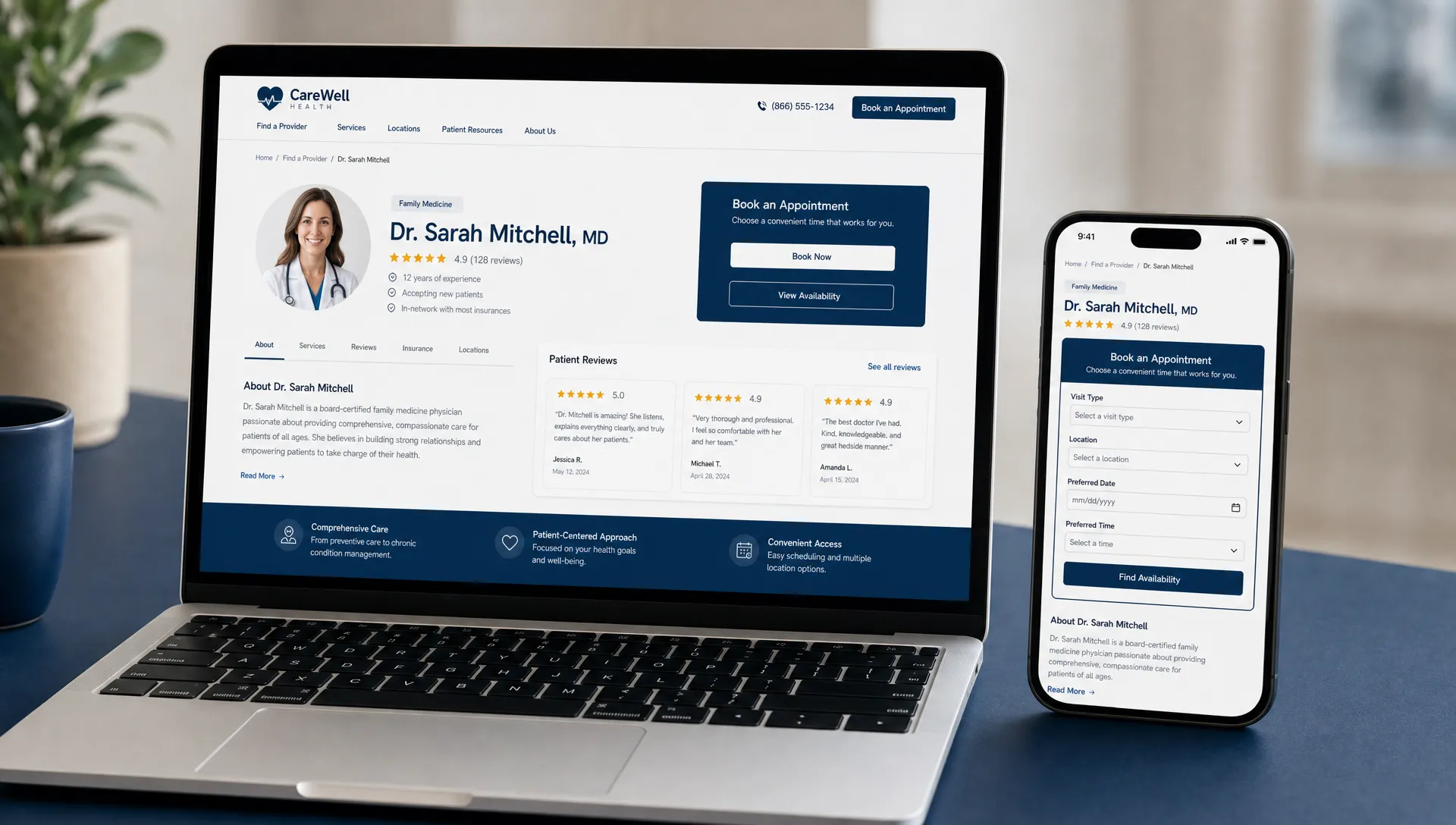
Patients should not have to hunt for a phone number, scroll through a carousel or decode vague wording to schedule. On mobile, the primary action should be visible immediately. For many practices, that means a sticky call button and a prominent Book Online or Request Appointment button. For specialty practices with higher consideration services, such as implants, LASIK or regenerative medicine, the first action may be Schedule a Consultation.
The wording should match how your practice actually schedules patients. If your team must review appointment requests before confirming, Request an Appointment is more accurate than Book Now. If your scheduling system offers real-time availability, Book Online sets the right expectation.
Small wording choices matter because patients notice friction. A button that promises instant booking but leads to a generic contact form can create frustration before the first visit ever happens.
Mobile-first design that respects how patients search
Most local healthcare searches happen in moments of need: between errands, during lunch, after a referral from a friend or while sitting in a car outside work. A desktop-first website misses how many patients actually behave.
A mobile-friendly healthcare website should have readable text, thumb-friendly buttons, short forms and fast-loading pages. Google uses Core Web Vitals as part of its broader page experience guidance, and slow performance can hurt both users and search visibility. Google Search Central explains that page experience signals are meant to measure how users perceive the experience of interacting with a web page.
For healthcare practices, speed is not just technical polish. A slow emergency dental page, dry eye treatment page or pain management landing page can lose a patient who is ready to schedule. If the page takes too long, the next provider in search results is one tap away.
A strong mobile design includes:
- A phone number that opens the dialer on tap
- A booking button visible without pinching or zooming
- Location, hours and parking information within easy reach
- Forms with only the fields needed to start the scheduling process
- Service pages that load quickly even on cellular connections
If you are planning a broader redesign, Louisville Web Lab’s guide to Louisville website design trends for healthcare covers the design shifts that matter most for trust, speed and conversions.
Service pages built around patient intent
A homepage can introduce your practice, but service pages often do the booking work.
Patients rarely search only for dentist, chiropractor or optometrist. They search for specific needs: tooth pain, Invisalign, dental implants, cataract surgery, dry eye treatment, sciatica relief, sports injury rehab or shoulder pain specialist. Your website should have dedicated pages for the services patients are actively researching.
A strong service page helps patients understand whether they are in the right place. It should explain the condition or treatment in plain language, identify who the service is for, describe what to expect at the first visit and provide a clear scheduling path. This is especially important for higher-value services that require more trust before booking.
For example, a dental implant page should not just say that implants are available. It should answer the questions patients bring into the decision: Am I a candidate, what happens during the consultation, are there financing options, how long does treatment usually take and why should I choose this provider?
The same principle applies across healthcare. A dry eye clinic page, chiropractic sciatica page or physical therapy post-surgery rehab page should reduce uncertainty before the patient contacts the office.
Trust signals placed near booking decisions
Healthcare websites need trust in the right places, not buried on an About page.
When a patient is deciding whether to call or book online, they look for evidence that the practice is credible, local and experienced with their concern. Trust signals work best when they appear near calls to action, service descriptions and provider profiles.
Useful trust elements include provider photos, credentials, review highlights, before-and-after examples where appropriate and compliant, insurance information, professional memberships and clear descriptions of your care approach. For specialty practices, provider bios should go beyond education and list the conditions treated, procedures performed and patient concerns commonly addressed.
Be careful with claims. Healthcare marketing should avoid exaggerated promises like guaranteed results or pain-free outcomes unless those statements are accurate, supportable and compliant. Patients want confidence, but they also recognize when copy sounds too polished to be real.
Short, privacy-aware appointment forms
A booking form should not feel like a medical intake packet. Its purpose is to start the scheduling conversation.
For most healthcare websites, the best appointment form asks for the minimum information needed to respond: name, contact information, preferred appointment type, preferred location if there are multiple offices and a brief optional note. Longer clinical details can usually wait until the patient portal, intake system or in-office paperwork.
When a form collects health information, privacy and security need to be handled carefully. The U.S. Department of Health and Human Services explains that the HIPAA Privacy Rule protects individually identifiable health information. Website forms, tracking tools and third-party integrations should be reviewed with appropriate legal, compliance and technical guidance.
A patient-friendly form also needs accessibility. The World Wide Web Consortium’s Web Content Accessibility Guidelines provide widely used standards for making web content more usable for people with disabilities. In practical terms, that means visible labels, clear error messages, keyboard-friendly navigation and enough contrast for patients with low vision.
| Booking friction | Better website feature | Why it helps patients book |
|---|---|---|
| Long contact forms | Short appointment request forms | Reduces effort before the first conversation |
| Hidden phone number | Sticky mobile click-to-call | Helps urgent patients reach the office quickly |
| Vague appointment wording | Clear Book Online or Request Appointment buttons | Sets accurate expectations |
| No provider information nearby | Provider bios and credentials close to calls to action | Builds confidence at the decision point |
| Confusing insurance details | Plain-language insurance and payment guidance | Removes a common reason patients hesitate |
Scheduling options that match the type of care
Not every healthcare appointment has the same urgency or decision process. Your website should reflect that.
A patient with a cracked tooth, acute back pain or sudden vision concern may prefer a phone call because speed matters. A cosmetic dentistry, orthodontic, LASIK or implant patient may prefer a consultation request because they need more information before choosing. A physical therapy patient may need to understand referrals, insurance or post-surgical protocols before scheduling.
The website should route these patients differently when appropriate. Urgent needs should emphasize call buttons, same-day language only if your practice truly offers it and office hours. Consultation-driven services should provide more education, trust signals and a lower-pressure request form. Routine care pages can often use direct online scheduling if your operations support it.
This is where healthcare website design differs from generic small business design. A restaurant, retail store or home services company can often use one conversion path. A healthcare practice may need several paths based on patient intent, clinical urgency and staff workflow.
Location pages that remove practical barriers
Patients do not only choose a healthcare provider based on services. They also decide based on distance, parking, hours, insurance and whether the office feels convenient.
A strong location page should include the office address, embedded map, hours, phone number, parking details, nearby landmarks and the services available at that location. If a practice has multiple offices, each location should have its own page rather than one generic locations page with a list of addresses.
This helps both patients and local SEO. Google Business Profile visibility, map rankings and location-specific website pages work together. A patient searching for a chiropractor near St. Matthews, an optometrist in Louisville or a pediatric dentist near their neighborhood needs signals that the practice is local and relevant.
If your site already gets traffic but does not convert enough of it, the issue may be the connection between search intent, page structure and booking flow. Louisville Web Lab explains that relationship in more detail in its article on how website design and SEO services drive more bookings.
Insurance, financing and payment clarity
Insurance and payment questions stop many patients from booking. If the website does not address them, the patient may leave to compare another practice or call the front desk with a question that could have been answered online.
You do not need to list every possible financial scenario on every page. You do need to make common next steps clear. Dental practices may explain insurance participation, membership plans or financing options. Vision practices may address medical versus vision insurance. Physical therapy and pain practices may explain referrals, accepted plans or self-pay options where relevant.
The best approach is plain language with a clear disclaimer when needed. For example, a page can say that coverage varies by plan and invite patients to contact the office for help verifying benefits. That gives patients useful direction without overpromising.
Payment clarity is especially important for elective or higher-consideration services. Cosmetic dentistry, clear aligners, LASIK and regenerative medicine patients often want to know whether financing is available before they schedule a consultation.
Real provider and team content
Stock photos can fill space, but they rarely build enough trust to book healthcare appointments.
Patients want to see who will treat them, what the office feels like and whether the team seems approachable. Real photography of providers, hygienists, assistants, therapists, technicians and the front desk can make the practice feel more familiar before the first visit. This is particularly helpful for pediatric dentistry, orthodontics, chiropractic, optometry and any service where anxiety may be part of the patient experience.
Provider pages should also be written for patients, not just peers. Credentials matter, but so does the provider’s approach to care. A good bio explains what the provider treats, how they communicate, what patients can expect and why they focus on that area of care.
For specialists, provider content can support both trust and search visibility. A page for an oral surgeon, cataract surgeon, pain physician or sports medicine provider can answer condition-specific questions while giving patients a reason to book with that clinician.
Reviews and reputation signals integrated into the journey
Reviews should not be treated as decoration. They are often one of the last pieces of evidence a patient considers before scheduling.
A healthcare website can use review highlights, testimonials where permitted and links to review platforms in a way that supports decision-making. The key is context. A review about a gentle hygienist belongs near family dentistry or dental anxiety content. A review about clear explanations belongs near specialty consultation pages. A review about fast access may support urgent care, pain or emergency dentistry pages.
Healthcare practices should also have an intentional reputation process beyond the website. Consistent review generation, thoughtful responses and accurate Google Business Profile information all support the same goal: helping patients feel confident enough to take action.
Avoid cherry-picking testimonials in ways that imply guaranteed medical outcomes. Focus on the patient experience, communication, access, comfort and confidence rather than making treatment promises.
Conversion landing pages for ads and campaigns
Google Ads traffic should rarely be sent to a generic homepage. If someone clicks an ad for dental implants, Invisalign, LASIK, dry eye treatment, knee pain care or physical therapy after surgery, the landing page should match that exact intent.
A conversion landing page has fewer distractions than a standard website page. It should keep the patient focused on one service, one location or one offer, then make the next step obvious. It should include the core information needed to act: who the service is for, why the practice is credible, what happens next and how to schedule.
For healthcare ads, landing pages also need careful compliance review. Claims, tracking, testimonials, forms and remarketing should be handled with the sensitivity healthcare requires.
The most effective campaign pages are not just attractive. They align the ad, the patient’s search phrase, the page content and the booking action. When those pieces match, the patient feels like they landed in the right place.
Follow-up automation for patients who do not book immediately
Many patients are not ready to schedule on the first visit. They may be comparing providers, checking insurance, talking with a spouse or waiting until their symptoms get worse. A good website should still create a path for follow-up.
Healthcare marketing automation can help practices respond faster and stay organized after a form submission, call inquiry or consultation request. The details depend on the practice’s systems and compliance needs, but the principle is simple: patients should not fall through the cracks after they raise their hand.
Follow-up can include appointment request confirmations, reminders to complete scheduling, educational emails for consultation-based services or internal notifications for the front desk. The goal is not to overwhelm patients. It is to give your team a better chance of converting interest into a booked visit.
Speed matters here. A patient who submits a form to three practices will often book with the one that responds first and communicates clearly.
Measurement built around booked appointments
A healthcare website should be judged by more than page views. Traffic matters, but the business outcome is booked patients.
At minimum, a practice should know which pages generate phone calls, appointment requests, online booking clicks and direction requests. For ad campaigns, the practice should also understand which keywords and landing pages produce qualified inquiries rather than just clicks.
Useful conversion points include:
- Mobile click-to-call taps
- Appointment form submissions
- Online scheduling button clicks
- Calls from landing pages
- Google Business Profile interactions
- Consultation requests by service line
This measurement helps practices make better decisions. If a dental implant page gets traffic but no consultation requests, the page may need stronger trust content or clearer financing information. If a chiropractic page gets calls but few booked visits, call handling or scheduling workflow may be the bottleneck. If a paid ads landing page converts well on desktop but poorly on mobile, speed or form usability may be the problem.
A design partner should be able to talk about these outcomes, not just colors, layouts and launch dates. If you are evaluating vendors, this guide on how to hire a website designer for a healthcare practice can help you ask better questions before committing.
A quick checklist for a booking-focused healthcare website
Use this checklist to evaluate whether your current website supports online booking or quietly creates friction.
| Website area | What to check |
|---|---|
| Header | Phone and booking action are visible on desktop and mobile |
| Homepage | Patients can identify services, location and next step within seconds |
| Service pages | Each major service has a dedicated page with patient-focused answers |
| Provider pages | Bios include credentials, care approach and conditions treated |
| Forms | Appointment forms are short, accessible and privacy-aware |
| Location pages | Address, hours, map, parking and local details are easy to find |
| Reviews | Reputation signals appear near booking decisions |
| Ads | Campaign traffic goes to service-specific landing pages |
| Tracking | Calls, forms and booking clicks are measured |
| Follow-up | New inquiries receive prompt, organized responses |
If several of these areas are weak, a redesign may help. If only one or two are weak, targeted improvements can sometimes lift bookings without rebuilding the entire site.
Frequently Asked Questions
What is the most important healthcare website design feature for online booking? The most important feature is a clear, easy-to-use appointment path on every high-intent page. Patients should always know how to call, request an appointment or book online without searching for the next step.
Should a healthcare website use Book Online or Request Appointment? Use the wording that matches your actual scheduling process. Book Online works when patients can choose a real appointment time. Request Appointment is better when your team needs to confirm availability, insurance or appointment type first.
How long should a healthcare appointment form be? It should be as short as possible while giving your team enough information to respond. Name, contact details, appointment type and preferred location are often enough to begin. Clinical intake can usually happen later through the proper workflow.
Do reviews really help patients book online? Yes, reviews can reduce hesitation when they are placed near service pages, provider profiles and calls to action. They work best when they reflect the real patient experience, such as communication, comfort, timeliness and confidence in care.
Can better website design improve healthcare SEO? Yes, when design supports fast loading, mobile usability, clear service pages, location relevance and patient engagement. Design alone is not a full SEO strategy, but it can make SEO traffic more likely to convert into appointments.
Turn your healthcare website into a booking asset
Your website should do more than explain who you are. It should help patients choose your practice, take the next step and become scheduled appointments.
Louisville Web Lab helps healthcare practices connect SEO, Google Ads, website design and automation into patient acquisition systems. If your current site gets traffic but not enough booked visits, or if it feels outdated compared with the level of care you provide, schedule a diagnostic strategy call with Louisville Web Lab.