
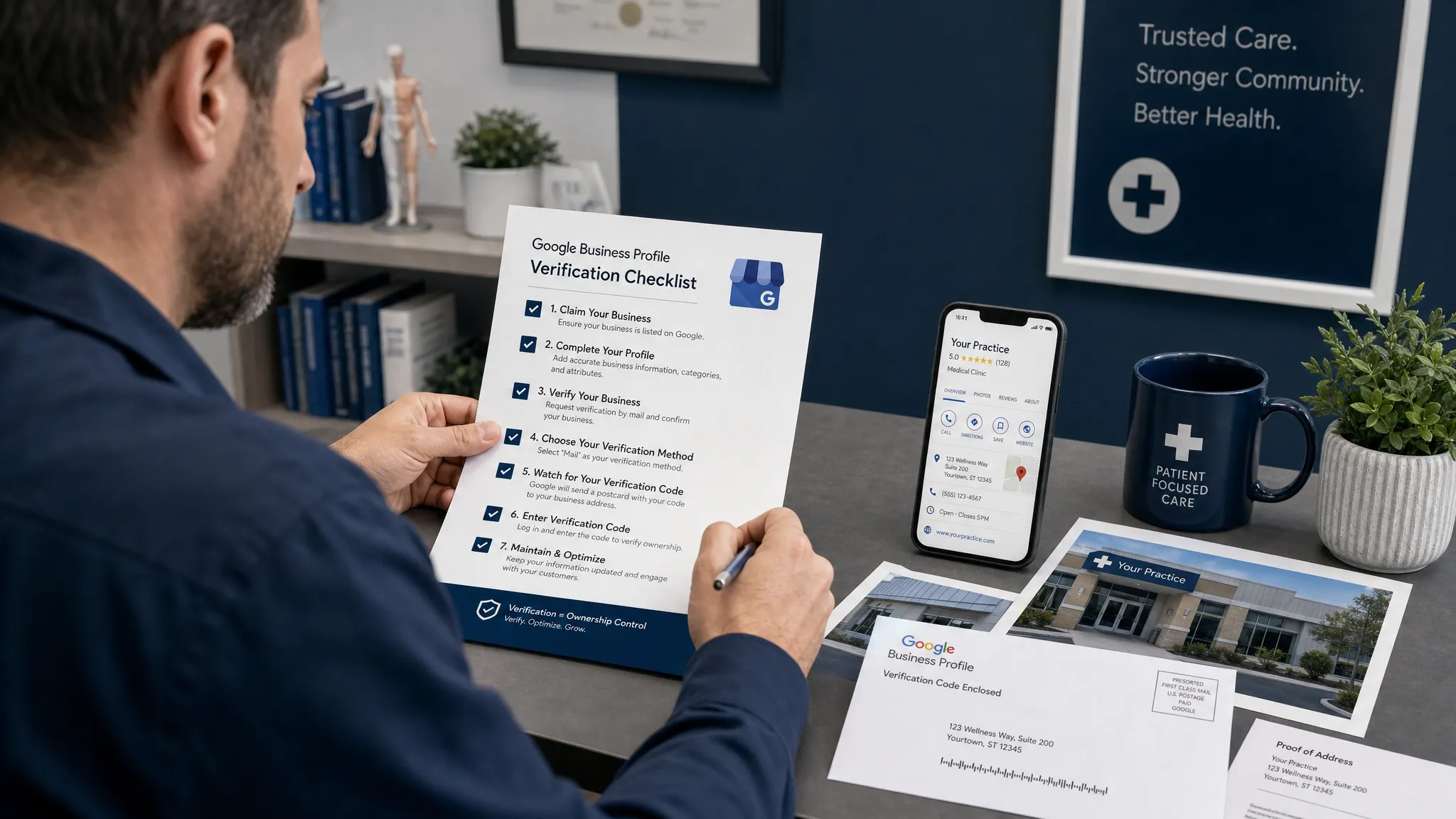
If you are trying to create a Google My Business account in 2026, here is the first thing to know: Google My Business is now called Google Business Profile. Many practice owners, office managers, and marketing teams still use the old name, but the account you create today is managed through Google Business Profile and appears across Google Search and Google Maps.
For healthcare practices, that profile is often the first impression a potential patient sees. Before they call your dental office, chiropractic clinic, optometry practice, pain management center, or physical therapy clinic, they may look at your hours, reviews, location, photos, services, and appointment options directly in Google.
This guide walks through the 2026 setup process clearly, with healthcare-specific notes so you can avoid duplicate listings, verification delays, compliance mistakes, and weak profiles that do not generate calls.
Google My Business vs. Google Business Profile in 2026
Google retired the Google My Business name years ago, but the phrase is still widely searched. In practical terms, when someone says they want to create a Google My Business account, they usually mean one of three things:
- Creating a new Google Business Profile for a business location
- Claiming an existing profile that already appears on Google Maps
- Getting access to manage a profile someone else created in the past
The profile itself is not just a directory listing. It can show your practice name, category, address, phone number, website, appointment link, hours, reviews, Q&A, photos, services, updates, and directions. For local healthcare searches like “dentist near me,” “eye doctor in Louisville,” “chiropractor open today,” or “pain clinic near me,” it can influence whether a patient chooses you or a competitor.
Before You Create the Account: What You Need
A clean setup starts before you touch the form. Google uses the information you provide to understand your business, verify legitimacy, and match your practice to local search intent.
Prepare the following details first:
- Business name: Use the real-world practice name exactly as it appears on signage, legal documents, and your website.
- Primary phone number: Use a local number when possible, ideally one answered by your front desk or call center.
- Practice address: Use the accurate patient-facing location. Avoid virtual offices, rented mailboxes, or addresses where you do not see patients.
- Website URL: Link to your homepage or a strong location page if your practice has multiple offices.
- Primary category: Choose the best match, such as Dentist, Orthodontist, Optometrist, Chiropractor, Physical Therapist, Pain Management Physician, or Medical Clinic.
- Business hours: Include normal hours, holiday schedules, and emergency or special hours when relevant.
- Photos and logo: Prepare exterior photos, interior photos, team photos, equipment photos, and a logo.
- Appointment URL: If your practice supports online scheduling, have the booking link ready.
For healthcare practices, accuracy matters more than clever marketing language. Google’s business name field is not the place to add “best dentist in Louisville” or “top-rated chiropractor near me.” That can trigger edits, suspensions, or trust issues.
Step-by-Step: How to Create a Google My Business Account in 2026
The process is straightforward, but each step affects how easily Google can verify and rank your profile.
1. Sign in with the right Google account
Use a Google account that your practice controls, not an employee’s personal Gmail account. If possible, create or use an admin-level account tied to your business domain.
This prevents problems later when a staff member leaves, an outside vendor changes, or a marketing agency needs access. Ownership should remain with the practice, even if you delegate management.
2. Search for your practice before creating a new profile
Before creating anything new, search Google Maps and Google Search for your exact practice name, old practice names, doctor names, phone number, and address.
This step is critical because your business may already exist on Google. Profiles can be created automatically from public data, user suggestions, third-party directories, or prior owners. Creating a duplicate profile can split reviews, confuse patients, and make local SEO harder.
If you find an existing profile, claim it instead of creating a new one. If you are unsure whether the listing is yours, Louisville Web Lab has a deeper guide on how to add your business to Google Maps the right way without creating duplicate problems.
3. Enter your official practice name
Use the name patients would see on your front door, website, insurance listings, and appointment reminders. Google generally expects the business name to reflect your real-world name.
Good examples include:
- Bluegrass Family Dental
- Eastside Orthodontics
- River City Chiropractic
- Louisville Eye Care Center
- Kentuckiana Pain Specialists
Avoid adding city names, services, taglines, or keywords unless they are part of your official business name. A practice called “Bright Smile Dental” should not list itself as “Bright Smile Dental Best Emergency Dentist Louisville.”
4. Choose the correct business type
Google may ask whether you have a physical location customers can visit, whether you provide services at customer locations, or both.
Most healthcare practices should choose a physical location if patients come to the office. Some providers, such as mobile physical therapists or home health-related services, may use a service-area setup if they travel to patients and do not see clients at a public office.
For most dentists, orthodontists, optometrists, chiropractors, pain physicians, and clinics, your patient-facing office address should be visible.
5. Add your address exactly and consistently
Enter your full address using standard formatting. Include suite numbers, floor numbers, or building identifiers when needed.
Consistency matters because Google compares your profile information with your website, insurance directories, medical directories, social profiles, and other citations. If your website says “Suite 210” but your profile says “Ste B” and a directory says “Unit 2,” Google may still understand it, but you are making the system work harder.
For multi-location practices, create or claim a separate profile for each eligible location. Do not use one profile for multiple offices.
6. Select your primary category carefully
Your primary category is one of the strongest relevance signals in your profile. It tells Google what type of business you are and what searches you should be considered for.
Choose the most specific category that matches your main service line. A dental implant specialist may still choose “Dentist” or “Dental Implants Periodontist” if available and accurate. An eye clinic may need to decide whether “Optometrist,” “Ophthalmologist,” or “Eye Care Center” is the best fit.
You can add secondary categories, but do not overdo it. Categories should reflect services you truly provide at that location.
| Profile field | Best practice for healthcare | Why it matters |
|---|---|---|
| Business name | Use the official practice name | Reduces suspension risk and builds trust |
| Primary category | Choose the most accurate clinical category | Helps Google match you to patient searches |
| Address | Use the real patient-facing location | Supports Maps accuracy and verification |
| Phone number | Use a local tracked or main office number | Makes calls easier to attribute and answer |
| Website link | Use the homepage or location page | Sends patients to the most relevant page |
| Hours | Keep regular and holiday hours updated | Prevents missed calls and frustrated patients |
| Photos | Add real office and team images | Improves confidence before the first visit |
7. Add your phone number and website
Your phone number should connect patients to someone who can answer scheduling, insurance, and service questions. If you use call tracking, use it carefully. The tracking number should be implemented consistently and should not break your core name, address, and phone consistency across the web.
For the website field, choose the destination that helps a patient take the next step. Single-location practices can usually use the homepage. Multi-location practices often perform better when each profile links to the corresponding location page.
8. Complete Google verification
Google will require verification before you can fully manage the profile. Available methods vary by business type, location, and account history. In 2026, common methods may include video verification, phone, text, email, postcard, or other checks.
For healthcare offices, video verification may ask you to show evidence that the business exists at the location. Be prepared to show exterior signage, the entrance, reception area, branded materials, equipment, business documents, or access to the location.
Make sure the person handling verification can physically access the office and understands what Google is asking for. Verification delays often happen because the video is incomplete, the signage is unclear, or the address does not match.
How to Optimize the Profile After It Is Created
Creating the account is only the foundation. The practices that win more local calls usually build a profile that is complete, accurate, active, and aligned with patient intent.
Start with the basics: add services, business descriptions, appointment links, photos, insurance-related notes where appropriate, and accessibility details. Your description should explain who you help and what you offer without sounding stuffed with keywords.
For example, a chiropractor might mention back pain, neck pain, sports injuries, and family chiropractic care if those are real services. A dentist might mention preventive, cosmetic, emergency, and implant dentistry if those services are offered at that location.
Reviews are also central to trust. Ask patients for reviews in a compliant, ethical way, and never pressure patients or offer incentives for positive feedback. When responding to reviews, do not reveal protected health information or confirm details about a patient’s care. A safe response is general, appreciative, and privacy-conscious.
Your photos should be real. Stock images rarely build the same trust as a clear exterior photo, a clean treatment room, smiling team members, parking information, and welcoming office images. For specialties where patients may feel anxious, such as oral surgery, pain management, or cataract surgery, real photos can reduce uncertainty before the first call.
Once the profile is live, review performance regularly. Google provides insights such as calls, website clicks, direction requests, messages, and search terms. These metrics help you understand whether your listing is visible and whether patients are taking action.
If your goal is more calls and visits, a setup alone is not enough. Use this guide to improve the profile’s conversion elements after launch: Google Business Listing Tips for More Calls and Visits.
Healthcare-Specific Mistakes to Avoid
Healthcare profiles carry higher trust expectations than many other local businesses. Patients are choosing a provider, not just a store or restaurant.
One common mistake is creating separate profiles for every provider inside the same practice without a strategy. In some cases, individual practitioner profiles are allowed, especially when providers are public-facing and have distinct patient relationships. But unmanaged practitioner listings can compete with the main practice profile, send patients to the wrong phone number, or collect reviews in the wrong place.
Another mistake is ignoring old listings after a move, merger, acquisition, or rebrand. If your practice changed names or locations, do not simply create a new profile and abandon the old one. You may need to update, claim, merge, or mark listings correctly to preserve trust and avoid patient confusion.
Practices should also be careful with review responses and Q&A. A patient may mention a diagnosis, procedure, billing issue, or appointment experience publicly. Your response should not confirm private details. Keep it general, invite the person to contact the office directly, and follow your internal privacy procedures.
Finally, do not use the profile as a dumping ground for every possible service keyword. Google is increasingly good at understanding relevance from categories, services, website content, reviews, and user behavior. A natural, complete profile is better than an over-optimized one.
What If Someone Else Already Owns the Profile?
If your profile already exists but you do not have access, request ownership through Google’s management flow. Google may contact the current owner and allow time for a response. If the owner does not respond, you may be able to verify your relationship to the business and gain access.
This happens often when a former employee, prior agency, old office manager, or previous owner created the profile years ago. The key is to keep ownership under a practice-controlled account once you regain access.
After access is restored, audit every field. Check the phone number, website link, categories, users, hours, photos, services, appointment link, and review response history. Remove users who no longer need access.
How a Google Business Profile Fits Into Local SEO
A Google Business Profile is one of the fastest ways to appear in local search, especially in the Map Pack. But it works best when paired with a strong website, location pages, consistent citations, review generation, and content that supports your services.
Google’s local results are influenced by relevance, distance, and prominence. You cannot control where a searcher is located, but you can improve how clearly Google understands your practice and how trustworthy your local presence appears.
For healthcare practices in competitive markets, the profile should connect to a broader patient acquisition system. That may include local SEO pages for high-value services, Google Ads for immediate demand, landing pages for conversion, call tracking, review automation, and follow-up workflows.
If you are trying to compete in local maps, especially in a market like Louisville, you can learn more about how to rank in the Louisville Map Pack and what signals matter beyond basic setup.
2026 Setup Checklist
Before you consider the profile finished, run through this checklist:
- The practice name matches your real-world branding.
- The address is accurate, including suite number if needed.
- The primary category is the most specific accurate option.
- Secondary categories reflect real services at that location.
- The phone number is correct and answered during business hours.
- The website link points to the best page for that location.
- Business hours, holiday hours, and special hours are current.
- The profile includes real photos of the office, team, and exterior.
- Services are added with clear, patient-friendly descriptions.
- The appointment link works on desktop and mobile.
- Review responses follow privacy-safe healthcare standards.
- All owners and managers are current and appropriate.
A complete profile helps Google understand your practice, but it also helps patients feel confident enough to call, book, or request directions.
Frequently Asked Questions
Is Google My Business still available in 2026? The name Google My Business is no longer the current product name. In 2026, you create and manage a Google Business Profile, which appears on Google Search and Google Maps.
Is a Google Business Profile free? Yes, creating and managing a Google Business Profile is free. You may choose to invest in SEO, Google Ads, photography, call tracking, or agency support, but the profile itself does not require a paid subscription.
Can a healthcare practice have more than one Google Business Profile? Yes, if the practice has multiple eligible locations, each location can usually have its own profile. Individual practitioner profiles may also be allowed in some cases, but they should be managed carefully to avoid confusion or internal competition.
How long does verification take? Verification time varies. Some profiles are verified quickly by phone, text, or email, while others require postcard or video verification. Healthcare practices should prepare proof of location, signage, and business legitimacy before beginning.
Should I use keywords in my business name? Only if those keywords are part of your real-world business name. Adding extra phrases like “best dentist near me” or “top chiropractor in Louisville” can create compliance and suspension risks.
What should I do after my profile is verified? Add services, photos, appointment links, hours, and a strong description. Then build a review system, monitor calls and direction requests, and connect the profile to your website and local SEO strategy.
Turn Your Google Business Profile Into Patient Growth
Creating a Google My Business account in 2026 is really about building a verified Google Business Profile that patients can trust. The setup is important, but the real value comes from what happens next: better visibility, more qualified calls, stronger reviews, and a smoother path from search to appointment.
If your healthcare practice wants more than a basic listing, Louisville Web Lab helps dental, vision, chiropractic, pain, physical therapy, primary care, and specialty practices turn local search visibility into measurable patient growth. A diagnostic strategy call can help identify what is missing, what is holding back your profile, and where your fastest growth opportunities are.